Oklahoma AbleTech is a GREAT organization offering training and education about digital accessibility.
Here's their guide from Lyssa Prince, who happens to hold my organization's Certified Professional in Web Accessibility certification. This information is for Zoom and Teams. Other systems may have other processes.
How to Pin an Interpreter in Online Meetings
It is always great to see ASL interpreters in an online meeting, but sometimes the meeting organizer may not know that they need to "pin" or "spotlight" an interpreter so that participants who need to see the interpreter always have them in view. If this is the case, both Zoom and Teams let you, the user, take control of your pins.
On Zoom, go to the Participants tab, select the menu next to the interpreter's name, and then select "Pin."
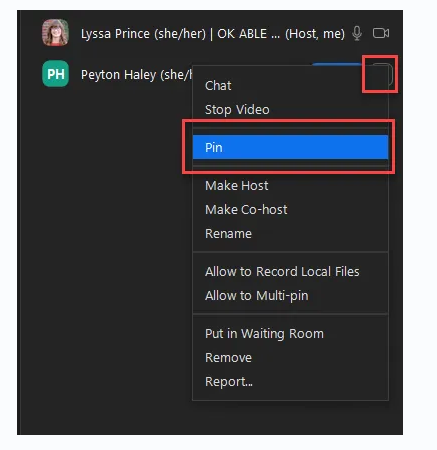
On Teams, go to the People tab, select the menu next to the interpreter's name, and then select "Pin for me."
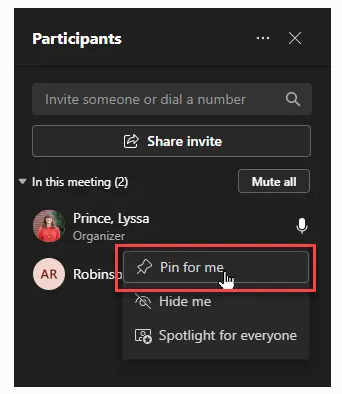
Also, did you know that in Zoom, "spotlight" works much the same way, but it's an option only for organizers? This works the same way as the "pin" functionality, but it sets a pinned video for ALL attendees.
--
Oklahoma ABLE Tech is Oklahoma's Assistive Technology (AT) Act program. As part of the organization's mission, the digital accessibility team offers training and technical assistance on topics related to digital accessibility, as well as accessibility evaluations of websites, web applications, and other types of digital content. To learn more about digital accessibility, you can visit the Digital Accessibility Program webpage or send an email to abt.a11y@okstate.edu.
------------------------------
Samantha Evans, CAE, ICE-CCP, MBA (she/her)
The Accessible CAE
sam.evans@accessibilityassociation.org
Certification Director
Intl. Assoc. of Accessibility Professionals, a division of G3ict
------------------------------